

Last Updated: October 24, 2026
Quick Summary
Reading sonar for salmon schools means treating marks as evidence, not proof: arches, blobs, and bait clouds show size class and behavior, never species. Build confidence by stacking depth, temperature, position relative to bait, and school structure before setting gear. Keep gain low, fish symbols off, and range just past bottom.
- The right edge of the screen is now; everything sliding left is history.
- A moderate chart speed gives you 30 to 60 seconds of history to judge marks.
- Salmon marks usually sit below or off the edge of a bait cloud, not inside it.
- At 2 to 3 mph trolling, salmon produce longer, flatter arches than stationary fish.
- A hard, thin, bright bottom return means rock or packed gravel; soft and thick means mud.
Table of Contents
- What a Sonar Screen Is Actually Telling You
- How to Identify Fish on Sonar Without Fooling Yourself
- Telling Salmon From Baitfish and Clutter
- Salmon Fishing Sonar Settings That Find Schools
- CHIRP Sonar for Salmon Fishing: What Changes on Screen
- How to Find Salmon While Trolling
- Reading the Bottom Return and Structure
- Picking a Sounder That Reads Salmon Schools Clearly
- Frequently Asked Questions
What a Sonar Screen Is Actually Telling You
Learning how to read sonar for salmon schools starts with one hard truth: your screen is not a camera. NOAA explains that fisheries sonar sends out sound pulses and measures how strongly they bounce back (NOAA Ocean Service).
That distinction matters. A mark is a return, not a confirmed salmon.
Here's the mental model: your sounder paints history. Every second, a new column of data appears on the right edge and everything else slides left. What you're staring at is a recording, not a live feed.
The Scroll: Right Is Now, Left Is Then
The right edge of the display is the present moment. The left edge is the oldest data still on screen.
When a mark appears on the right and slides left, that's a fish passing beneath the boat.
That's why trolling anglers love a moderate scroll speed, you can look back 30 seconds and see whether a mark was a single fish or the leading edge of a school.
Depth, Range, and the Water Column
The vertical axis is depth. The horizontal axis is time.
Set your range to match the water you're fishing. In 60 feet of water, a 0-80 foot range fills the screen with detail; leave it on 0-400 and everything compresses into a thin band at the top.
The water column is the space between the surface and the bottom return. That's where salmon live, feed, and travel. Read it like a vertical map: top third, middle, bottom third.
How to Identify Fish on Sonar Without Fooling Yourself
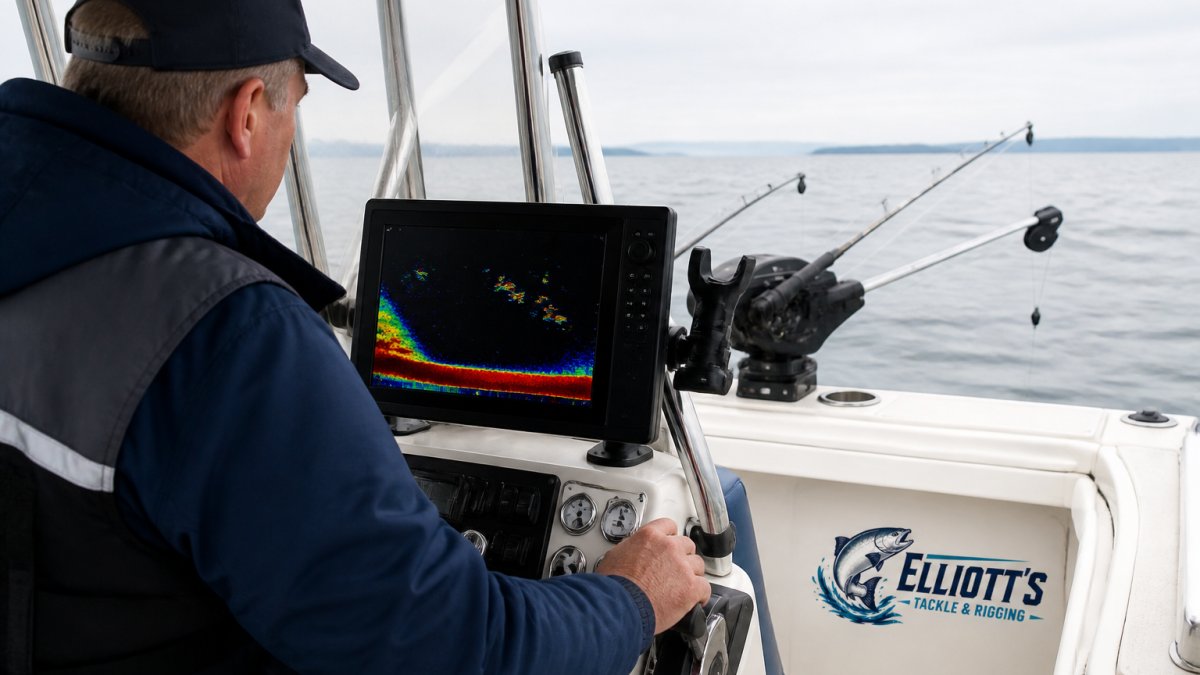
Fish marks come in three broad shapes: arches, blobs, and bait clouds. Each tells a different story.
Arches, Blobs, and Bait Clouds
A blob is a fish that stayed in the beam, or several fish stacked tight, common with suspended fish that aren't moving much.
A bait cloud is a diffuse smear of small returns. It looks like static or fog.
Here's the trap: a perfect arch is not proof of a salmon. Lake trout, dogfish, and even suspended debris throw arches.
Telling Salmon From Baitfish and Clutter
No consumer sonar unit can tell you a mark is a salmon. The return measures sound reflection, not species. What you can do is stack circumstantial evidence, mark shape, position in the water column, behavior, season, and what else is on screen, until the probability is high enough to set gear. That skill puts more salmon in the boat.
Why a Mark Is Not a Species
A salmon, a lake trout, and a dogfish of similar size and orientation produce nearly identical arches. The transducer sees a swim bladder and body outline, not scales or fins.
What you can read is size class and behavior. A thick, solid arch holding depth is a larger fish; a smear of small returns is bait; a mark that rises toward your gear is an active feeder.
The Salmon Evidence Stack
Use this checklist to build confidence before you commit gear:
- Depth and temperature: Salmon hold in specific temperature bands. Kings often sit deeper and tighter to structure; coho and pink salmon frequently run higher and more scattered. If your downrigger probe shows a preferred band and marks sit inside it, odds improve.
- Position relative to bait: Salmon marks usually sit below or off the edge of a bait cloud, not inside the densest part. A thick mark trailing a bait ball is a classic predator signature.
- Behavior: A mark that lifts from 80 feet to 60 as your gear approaches is showing interest. That is far stronger evidence than shape alone.
Clutter and False Positives
Clutter is the enemy of clean reading. Boat wake, aerated water, and a poorly tuned gain setting smear the display. If the whole screen looks cloudy, your sensitivity is too high, back it down until the water column goes mostly dark and only real targets stay bright.
Watch for these tells:
SI-TEX CVS-126 Dual Frequency Color Echo Sounder →
- Isolated thick marks below a bait cloud: likely predators, possibly salmon
- Tight bait balls with fish hugging the edges: active feeding zone
- Uniform small specks across the whole column: plankton or noise, not fish
A common mistake is cranking gain to "see more." In practice, that hides more than it shows. The best sonar readers run clean screens and let behavior confirm what the mark suggests.
Salmon Fishing Sonar Settings That Find Schools
Settings are where most anglers lose the salmon before they ever see a mark. The goal is not a pretty screen; it's a screen that shows the difference between a bait cloud and the predators working its edge. Start with auto mode if your unit has it, then fine-tune by hand. Here's a starting point for most units:
| Setting | Starting Point | Why It Matters for Salmon | Adjust When |
|---|---|---|---|
| Frequency | 200 kHz shallow, 50 kHz deep | Higher frequency gives sharper target separation in the top 100 feet where salmon often feed; lower frequency punches deeper | Marks get fuzzy or you need more depth |
| Gain/Sensitivity | Auto, then trim down slightly | Slightly low gain keeps bait clouds from blooming into one smear and lets individual salmon returns stand out | Screen looks cloudy or noisy |
| Range | Just past bottom depth | Compressing the water column into a thin band hides the depth separation between bait and salmon | Fish suspend deep in deep water |
| Chart speed | Moderate | A moderate scroll gives you 30-60 seconds of history to judge whether a mark was a single fish or the leading edge of a school | You want a longer history to review |
| Color palette | High-contrast | Sun glare washes out weak returns; a high-contrast palette keeps the difference between hard and soft targets visible | Sun glare washes out the display |
| Fish symbols | Off | Icons guess at size and hide the actual return shape, which is the information you need to judge a salmon mark | You want raw returns, not icons |
Fish symbols are tempting. Turn them off. They guess at size and hide the actual return shape, which is exactly the information you need.
Settings for Trolling and Moving Boats
Trolling changes how marks appear. At 2-3 mph, a salmon holding depth produces a longer, flatter arch than a stationary fish because it stays in the beam longer, normal, not a different species. Two adjustments help:
- Scroll speed: A moderate chart speed gives you enough history to see whether a mark rose toward your gear or stayed put. Too fast and the evidence slides off screen before you can read it.
- Transducer position: A transom-mounted transducer can lose bottom at speed or show propeller turbulence. A trolling motor or through-hull mount holds a cleaner picture. If your screen breaks up only when you throttle up, the transducer is the problem, not the fish.
A Simple Troubleshooting Path
When the screen looks wrong, work this sequence before touching the gain:
- Is the bottom line solid? If not, check transducer angle and connection first.
- Is the whole column cloudy? Lower sensitivity until the water goes dark.
- Are marks fuzzy at depth? Switch to a lower frequency or slow down.
- Are you marking bait but no predators? Change depth range to focus on the band where bait sits, and watch the edges of the cloud.
- Is the screen clean but empty? Move. No settings fix empty water.
CHIRP Sonar for Salmon Fishing: What Changes on Screen
CHIRP sonar sweeps a range of frequencies in each pulse instead of firing one. The payoff is sharper target separation and less noise, individual fish inside a bait cloud show as distinct marks rather than one blurry mass.
That's a real advantage for salmon. A Mega DI dual spectrum CHIRP trolling motor transducer lets you see that sharper target separation on your own screen.
How to Find Salmon While Trolling
Trolling turns sonar reading into a moving puzzle, you're watching how marks respond as baits pass through, not just what's below.
Watch for marks that rise toward your downrigger depth.
When you mark a school, note the depth and set your gear just above it. Setting up downrigger stackers is the natural next step to present baits at that depth.
Reading the Bottom Return and Structure
The bottom return is the brightest, thickest line on your screen.
Why care? Salmon relate to structure. Hard bottom edges, drop-offs, and humps concentrate bait, and bait concentrates salmon. A soft flat bottom with no features is usually a dead zone.
The bottom return also helps you confirm depth and avoid dragging gear. If the line jumps or breaks up, you're over uneven structure. Slow down and watch closely.
Picking a Sounder That Reads Salmon Schools Clearly
Screen quality decides how much you can actually read. A professional CHIRP sonar module is one concrete option for resolving salmon schools.
A few units we'd point serious salmon anglers toward:
- SI-TEX CVS-126 Dual Frequency Color Echo Sounder: a 5.7" color display with a digital signal processor that separates baitfish, individual fish, and schools. Its Sona-Tone audio alerts even tell you when you're over a school while your eyes are on the water. Priced at $703.99.
- SI-TEX SVS-760 Dual Frequency Sounder: a 600W unit with a 7.5" sunlight-viewable display, White Line bottom discrimination to pull bottom-hugging fish off the floor, and readings to 4,800 feet. Priced at $806.99.
- Garmin GPSMAP 8610xsv Combo: a 10" full HD touchscreen with built-in dual-channel 1 kW CHIRP and ClearVü/SideVü scanning, plus preloaded Navionics+ charts. Priced at $2,108.99.
If you want an all-in-one display with dual-channel CHIRP, the Furuno NavNet TZtouch3 16" MFD w/1kW Dual Channel CHIRP™ Sounder & Internal GPS puts the sounder and screen in one unit.

Our advice: match the unit to your water. Great Lakes and coastal trolling reward clean shallow-to-mid readings; deep offshore work needs power and a glare-readable display.
Frequently Asked Questions
How can you tell salmon from baitfish on sonar?
Bait shows up as a tight, dense cloud of small returns, often hugging structure or suspended in a ball. Salmon marks are larger and more separated, and a school of salmon reads as several distinct returns rather than one solid mass. The SI-TEX CVS-126 uses DSP filtering that separates baitfish, larger individual fish, schools, and the sea floor, which makes that distinction easier to see. Treat any single mark as a candidate, not a confirmed salmon, until you see size and spacing repeat.
What salmon fishing sonar settings help locate schools?
Start with automatic gain and range so the unit settles the baseline, then narrow the depth range to the band you expect fish to hold in. Too much sensitivity fills the screen with clutter and hides real returns; too little drops small marks. On a dual-frequency unit, 200 kHz gives sharper detail in shallower water while 50 kHz holds a wider cone in deeper water. Turn on White Line or Bottom Lock if your unit has it, so fish tight to the bottom separate from the seabed.
Is CHIRP better than traditional sonar for finding salmon?
CHIRP sends a swept range of frequencies instead of a single pulse, which sharpens target separation and cleans up the display. That helps when salmon sit tight to structure or when you are sorting a school from bait. Traditional 2D sonar still reads schools well and costs less. The Garmin GPSMAP 8610xsv includes built-in dual-channel 1 kW traditional CHIRP sonar plus ClearVü and SideVü, so you get both presentations on one screen.
How do you read sonar while trolling for salmon?
Watch the right edge of the screen for what is passing under the boat now, and read left for history. At trolling speed the cone sweeps new water constantly, so a mark that appears at the right edge and drifts left is a fish you just passed. Note the depth it held, then repeat that depth on the next pass. Keep an eye on your downrigger weight as a reference line, and watch for marks rising toward your gear rather than sitting still.
Reading sonar well takes time on the water, and the right gear makes the learning curve shorter. Elliott's Tackle & Rigging hand-picks electronics and rigging for anglers who fish hard, with free shipping and 30-day returns so you can get the setup right. We won't sell you gear we wouldn't run on our own boat. Get started with Elliott's Tackle & Rigging and put a clearer picture under your hull.

0 comments