

Table of Contents
- Marine Electronics Setup for Beginners: Where to Start
- Essential Marine Electronics for Small Boats
- Understanding Marine Protocols: NMEA 2000 vs NMEA 0183
- Marine Electronics Wiring Diagram and Circuit Basics
- Marine Electronics Installation Cost and Budget Planning
- Marine Electronics Troubleshooting for Beginners
- Mobile App Integration and Modern Connectivity
- Common Mistakes to Avoid in Your Marine Electronics Setup
Marine Electronics Setup for Beginners: A Complete Guide
Last Updated: July 21, 2026
Getting your first marine electronics setup installed correctly can feel overwhelming. The good news: you don't need to be an electrician to get this right. This guide walks you through every major component, the wiring basics you need to know, and the mistakes that derail most first-time setups.
Marine Electronics Setup for Beginners: Where to Start
Before you buy anything, understand what you're building. A marine electronics setup typically includes a chartplotter (navigation center), a fish finder (sonar), a VHF radio (communication), and the wiring that ties them together. Some systems talk through NMEA 2000; others use NMEA 0183 or run standalone.
The biggest mistake beginners make is buying components that don't talk to each other. You'll end up with three separate screens instead of one unified display. Decide upfront whether you want everything integrated into a single Multi-Function Display (MFD), or whether you're comfortable running separate devices.
Start by measuring your console space and power budget. How many inches of screen real estate do you have? What's your battery capacity? These constraints determine what's feasible for your boat.
Essential Marine Electronics for Small Boats
Most small boats under 30 feet need four core components: a chartplotter, a fish finder, a VHF radio, and basic wiring infrastructure.
Multi-Function Displays and Chartplotters
A Multi-Function Display (MFD) is the brain of your system. It's a touchscreen that shows your GPS position, chart data, fish finder sonar, and often engine information all in one place. The chartplotter is the navigation component inside the MFD, displaying your position on electronic charts and helping you navigate to waypoints.
For beginners, a 7-inch MFD is the sweet spot. It's large enough to see detail, small enough to fit most consoles, and affordable enough to upgrade later without major regret.
The key decision is whether you want your MFD to be the hub that everything connects to, or whether you're comfortable running independent devices. A hub-based system is cleaner and more integrated, but costs more upfront.
GPS, Fish Finders, and Depth Sounders
Your GPS receiver is usually built into the MFD, but it needs a good antenna mounted high on your boat, typically on the hardtop or mast. A poor antenna location means weak signals and inaccurate positioning.
A fish finder uses sonar to see what's below your boat. The transducer sends sound waves down and listens for echoes. A depth sounder simply tells you how deep the water is. For saltwater fishing, a fish finder with at least 1000 watts of power is standard.
The transducer is critical. A transom-mounted transducer (bolted to the back of your boat) is easiest to install but can lose signal at high speed. A thru-hull transducer (drilled through the hull) gives cleaner data but requires more installation work. For a first setup, transom-mount is fine.
VHF Radio and Communication Systems
A VHF radio is your safety device and your way to talk to other boats and the coast guard. A basic VHF radio has a handset you hold, or you can get a fixed radio mounted in your console with a remote microphone. The antenna goes up high, usually on the hardtop or mast.
Channel 16 is the international distress and hailing frequency. Channel 9 is often used for commercial traffic. A VHF radio with a GPS receiver built in can send your position to the coast guard in an emergency (Digital Selective Calling). This is valuable safety equipment, though not absolutely required for a basic setup.
Understanding Marine Protocols: NMEA 2000 vs NMEA 0183
Your marine electronics need to talk to each other through standardized languages called protocols.
NMEA 0183 is the older standard. One device sends data, and another listens. A fish finder sends depth data to your MFD. It works, but it's slow and limited. If you want to send the same data to three different devices, you need three separate cables.
NMEA 2000 is the modern standard. It's a two-way network where multiple devices can send and receive data on the same backbone cable. Your fish finder, GPS, engine monitoring system, and autopilot all plug into one network and share data. It's faster, more reliable, and requires less wiring.
NMEA 2000 is more expensive upfront because you need a network backbone cable and certified connectors. But if you plan to expand your system later, NMEA 2000 saves you money and headaches. For a true beginner setup on a budget, NMEA 0183 works fine.
| Protocol | Data Flow | Cable Requirement | Cost | Best For |
|---|---|---|---|---|
| NMEA 0183 | One-way | Individual cables per device | Lower | Single devices, simple setups |
| NMEA 2000 | Two-way network | Single backbone cable | Higher | Multi-device integration, future expansion |
Marine Electronics Wiring Diagram and Circuit Basics
Wiring is straightforward once you understand the basic principle: electricity needs a path from the battery, through your equipment, and back to the battery.
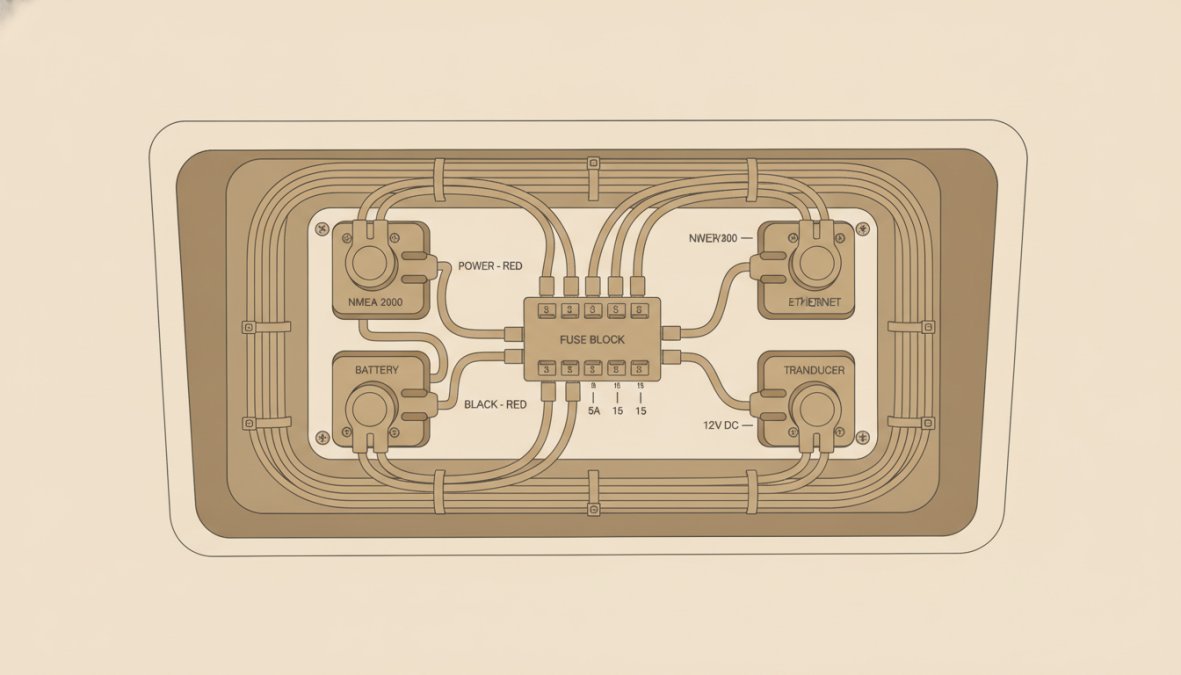
Every device needs three connections: positive (red wire from the battery), negative (black wire to ground), and often a data wire (for NMEA communication). The positive wire goes through a fuse or breaker first, this protects the wire from overheating if something goes wrong.
Your main battery is usually located in the engine compartment or under a console. From there, a heavy-gauge wire runs to your main breaker. From the main breaker, smaller wires branch out to each device. The negative wires all tie together at a common ground point, usually a bus bar bolted to the battery negative terminal. This ground point is critical; a poor ground connection causes intermittent failures.
Wiring Harness and Bulkhead Installation
A wiring harness is a bundle of pre-made cables that connect your components. Using the harness that comes with your equipment is always better than piecing together individual wires.
A bulkhead is a waterproof connector that passes through your console wall. You drill a hole sized for the bulkhead connector, snap it in place, and connect your wires on both sides. It's waterproof and professional-looking.
Installation steps are straightforward: run your power and data cables from the battery area to your console, keeping them away from hot engine components and moving parts. Use cable ties to secure them every 12 inches. At the console, route the cables through the bulkhead, then connect them to your MFD and other devices.
The most common mistake is running cables along the engine exhaust or near moving belts. Heat and vibration will destroy your wiring insulation within months.
Circuit Protection and Voltage Drop
Every power wire needs a fuse or breaker sized to the wire gauge. If your wire is rated for 20 amps, your fuse should be 20 amps. Use a larger fuse, and the wire overheats before the fuse blows, that's a fire risk.
Voltage drop is the loss of electrical power as current travels through a long wire. A long run from your battery to your console loses some voltage along the way. The fix is to use thicker wire for long runs. Most marine electronics manuals specify the wire gauge required for your installation distance.
Keep your runs as short as possible, and use marine-grade tinned copper wire (not automotive wire). Tinned wire resists corrosion in the salt air environment.
Marine Electronics Installation Cost and Budget Planning
The cost of a marine electronics setup ranges widely depending on what you choose.
Budget-Based Tiered Setups
Tier 1, Minimal Setup ($1,500-$3,000): A 7-inch chartplotter, a basic fish finder with transom transducer, and a handheld VHF radio. Everything works, but you're looking at multiple screens and minimal integration.
Tier 2, Integrated Basics ($3,000-$6,000): A 9-inch MFD that integrates your chartplotter and fish finder into one screen, a fixed VHF radio with remote microphone, and basic NMEA 0183 connectivity. This is where most beginners should aim.
Tier 3, Advanced Integration ($6,000-$12,000+): A large MFD (10-12 inches) with NMEA 2000 networking, a high-powered fish finder with multiple transducers, a VHF radio with DSC, and room to add autopilot or radar later.
The difference between Tier 1 and Tier 2 is usually worth it. You get one screen instead of three. The difference between Tier 2 and Tier 3 is luxury and future-proofing, not necessity.
DIY vs Professional Installation
You can install most marine electronics yourself if you're comfortable with basic wiring and following instructions. The MFD and fish finder mount easily, and the wiring is straightforward.
Professional installation costs vary, but expect to pay labor for console work, wiring, antenna mounting, and testing. If your boat needs significant electrical work, professional installation makes sense. If you're just mounting a display and connecting a few wires, DIY is reasonable.
The risk with DIY is a poor ground connection or a misrouted cable that causes intermittent failures. If you're not confident in your wiring skills, pay for professional installation.
Marine Electronics Troubleshooting for Beginners
Most problems fall into a few categories: no power, no data, or poor antenna signal.
Connectivity and Integration Issues
If your MFD isn't showing fish finder data, the problem is usually a loose NMEA cable connection or a cable routed too close to the VHF antenna (which creates interference). Check every connector and wiggle them. Corrosion can prevent a connection from working even if it looks fine.
If your GPS position is jumping around or missing entirely, your antenna is the culprit. Reposition it away from other electronics and metal objects. Mount it as high as possible.
If your fish finder is showing a flat line at the bottom instead of detailed structure, your transducer is either not in the water or you're moving too fast. Slow down and see if the image improves.
VHF radio problems are usually antenna-related. If your radio transmits but nobody hears you, your antenna is either poorly mounted or damaged.
Firmware and Software Updates
Modern marine electronics receive software updates that fix bugs and add features. Check the manufacturer's website periodically for updates to your MFD and fish finder.
Most updates are straightforward: download the file to a USB drive, plug the drive into your display, and follow the on-screen prompts. The update takes 10-30 minutes. Before updating, make sure your battery is fully charged and you have 30 minutes of uninterrupted time. Never unplug the device during an update.
Mobile App Integration and Modern Connectivity
Many modern MFDs have companion mobile apps that let you view your charts and sonar on your phone or tablet. Some apps also let you control your MFD remotely, marking waypoints or adjusting sonar settings.
The connectivity works through WiFi or Bluetooth. Range is typically 50-100 feet depending on the system. Mobile integration is most useful if you plan to upgrade your system later. If you're starting with a basic setup, focus on core functionality first.
Common Mistakes to Avoid in Your Marine Electronics Setup
Running power cables next to data cables. Power wires create electromagnetic interference that corrupts data signals. Keep power and data cables separated by at least 6 inches, or run them through separate conduits.
Undersizing your battery for the load. Calculate your total current draw (add up the amps listed on each device), and make sure your battery capacity is at least 4 times that amount. A 100-amp-hour battery is typical for a small boat with moderate electronics.
Mounting the GPS antenna too low. A GPS antenna mounted at console level gets blocked by the hardtop or cabin. Mount it as high as possible on the hardtop, mast, or T-top.
Mixing marine-grade and automotive components. Automotive fuses, breakers, and wiring corrode quickly in the salt environment. Use marine-grade components throughout.
Not planning for expansion. If you install a basic NMEA 0183 system now, adding a second display or autopilot later requires rewiring. NMEA 2000 costs more upfront but makes expansion simple.
Skipping the ground connection. Every negative wire should tie back to a common ground point at the battery. A single ground bus bar solves this.
Getting your marine electronics setup right the first time saves months of frustration. Start with the essentials, a chartplotter, fish finder, and VHF radio, and expand later as your skills and budget allow. Elliott's Tackle & Rigging stocks professional-grade marine electronics hand-selected by experienced captains who understand what actually works on the water. We focus on reliability and durability because equipment failure on the water isn't just inconvenient, it's dangerous.
Frequently Asked Questions
What marine electronics do beginners need on their boat?
Most beginners need a GPS chartplotter for navigation, a fish finder with transducer for depth and structure detection, and a VHF radio for communication. An engine monitoring system helps track vital performance metrics. These core components integrate through NMEA 2000 or NMEA 0183 protocols, allowing data sharing between devices. Your specific needs depend on boat size, fishing style, and waters you navigate. Start with navigation and communication, then add fish finding capabilities as your skills develop.
How much does it cost to install marine electronics?
Installation costs vary based on system complexity, boat type, and whether you hire professionals or DIY. Budget-conscious setups with basic GPS and fish finder components can start at modest price points, while comprehensive multi-function display systems with radar and autopilot integration cost significantly more. Labor for professional installation depends on wiring complexity and bulkhead modifications needed. For current pricing on specific equipment and installation services, contact Elliott's Tackle & Rigging directly for a quote tailored to your boat.
Can I install marine electronics myself?
Yes, many beginners successfully install basic marine electronics like GPS chartplotters and fish finders with proper planning. You'll need basic tools, understanding of marine-grade wiring practices, and knowledge of circuit protection requirements. More complex installations involving engine monitoring systems, VHF radios with antenna placement, or multiple integrated NMEA 2000 devices benefit from professional expertise. Start with simpler components to build confidence, follow manufacturer instructions carefully, and ensure all connections are waterproof and properly labeled for future troubleshooting.
What's the difference between NMEA 2000 and NMEA 0183 protocols?
NMEA 0183 uses serial connections with one-way data flow, suitable for basic setups with limited device integration. NMEA 2000 uses a backbone network allowing two-way communication between multiple devices simultaneously, enabling true system integration. NMEA 2000 supports more data types including engine monitoring, autopilot, and AIS information. Modern marine electronics increasingly favor NMEA 2000 for its superior interoperability and bandwidth. For beginners, NMEA 2000 offers better long-term flexibility if you plan to expand your system over time.
How do I troubleshoot common marine electronics issues?
Start with connectivity checks: verify NMEA 2000 or NMEA 0183 cable connections are secure and undamaged. Check voltage levels at circuit breakers, low voltage causes display and sonar issues. Update firmware and software regularly, as outdated versions cause integration problems. For fish finder issues, inspect transducer connections and calibration settings. Verify antenna placement for VHF and GPS, obstructions reduce signal quality. Label all connections clearly during installation to simplify future troubleshooting. If issues persist, consult manufacturer documentation or seek professional support.
What are the best brands for marine electronics for beginners?
Elliott's Tackle & Rigging hand-selects marine electronics specifically tested in Pacific Northwest waters by experienced captains. Our curated selection focuses on reliability, durability, and field-proven performance rather than flashy features. Every product is chosen because our team would run it on their own boats. We prioritize gear that integrates well, offers intuitive user interfaces, and delivers real-world value for serious anglers. Visit Elliott's Tackle & Rigging to explore captain-curated options suited to your specific setup needs.
This article was written using GrandRanker
0 comments